25 min read
Learn how to turn a repeated process into a clearly defined ChatGPT Dot responsibility—with the access, authority, schedule, verification, and human control it needs.
What changes when AI does not stop after one prompt? This Guide shows you how to turn a repeated process into a bounded ongoing responsibility while preserving human control over consequential decisions.
Most AI work begins with a prompt.
You ask for something, review the answer, and decide what to do next. If another step is needed tomorrow or next week, you return and start the process again.
ChatGPT Dot introduces a different possibility: you can give AI a continuing responsibility.
Instead of waiting for every instruction, your Dot can keep track of defined work, begin at an agreed time, use approved sources, complete routine steps, and return when it has a result or needs your judgment.
That does not mean giving AI unrestricted control. A useful Dot responsibility has a clear purpose, a bounded workflow, the minimum access it needs, explicit authority, and evidence that proves the work was completed correctly.
This Guide will help you build one.
By the end, you will have:
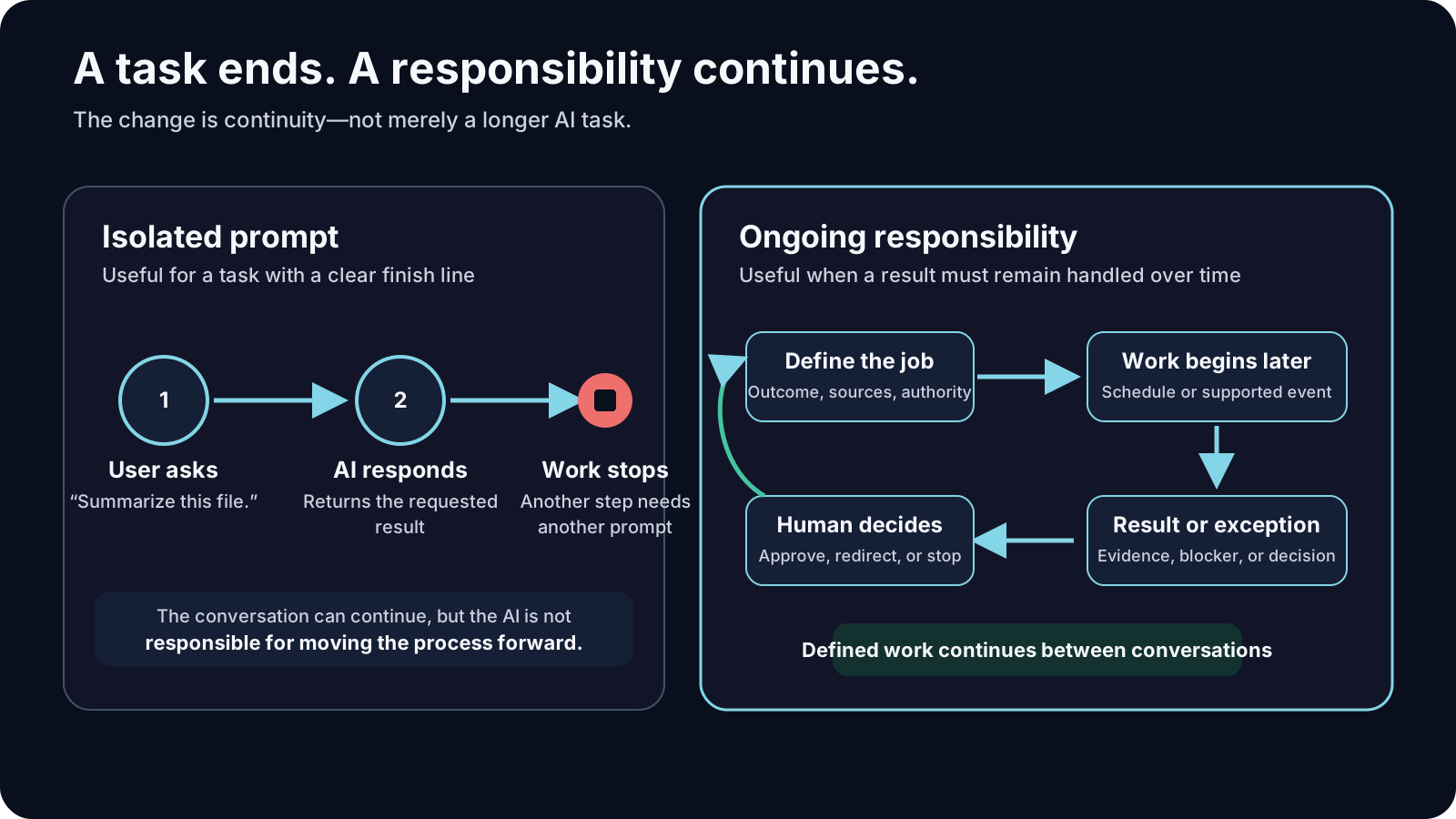
A task has a finish line: summarize this file, draft this message, or compare these products.
An ongoing responsibility has a state that must remain handled over time: keep a project readiness list current, prepare evidence before a recurring meeting, or collect and validate a report every Monday.
The difference is not merely duration.
A well-defined responsibility answers questions a normal prompt often leaves unresolved:
Your Dot is most useful when the repeated work follows a recognizable process but still benefits from judgment when circumstances change.
It is not a reason to automate an unclear process. If you cannot explain how you normally know the work is correct, the Dot will not know either.
Before writing the full responsibility, understand where the work will happen and what each connection actually allows.
Open your Dot and confirm the basic options available in your account. Depending on your plan and workspace, you may be able to use it through ChatGPT, supported messaging channels, connected apps or plugins, its cloud computer, and one connected personal computer.
Do not assume that seeing a product in a menu means your Dot can perform every action inside it. Availability and permissions are separate questions.
The interface examples use a fictional Dot named Northstar Assist and fictional Northstar information so the controls can be shown without exposing private work. The full Northstar scenario appears later in the Guide.
Your Dot can send updates and questions in its ChatGPT conversation. Depending on the contact methods available to your account, you may also be able to reach the same Dot through Slack or Microsoft Teams and tell it which updates belong in each channel.
Texting through iMessage or RCS on Android is also available to some users as a limited beta. When texting is available, the Dot can send an approval link that opens the request in ChatGPT.
You can call your Dot inside ChatGPT to discuss work, clarify a decision, or request a progress update. At the time this Guide was verified, calls were initiated by the user; a voice call should not be described as a dependable channel for the Dot to initiate an urgent notification.
Choose the contact method as part of the responsibility. For example:
Connecting a contact method does not connect your apps, inbox, or computer. Those connections must be established separately.
Keep routine progress and final completion reports in ChatGPT. Contact me through [APPROVED CONTACT METHOD] only when the work is blocked, a completion condition fails, or you need a decision or approval from me. Do not repeat unchanged alerts. Confirm which contact methods are currently available and where you will send each type of update.
Your Dot has its own cloud computer and browser. Work performed there can continue while your devices are off. Its browser sessions, files, and software are separate from those on your personal computer.
This is appropriate when the responsibility can be completed using:
Some responsibilities require your own computer because they depend on local files, installed applications, local code, or an authenticated session available only there.
When you connect a personal computer, it must remain online with the ChatGPT app open while the Dot uses it. Connecting a computer to Dot is separate from other ChatGPT, Work Sync, or Codex connections.
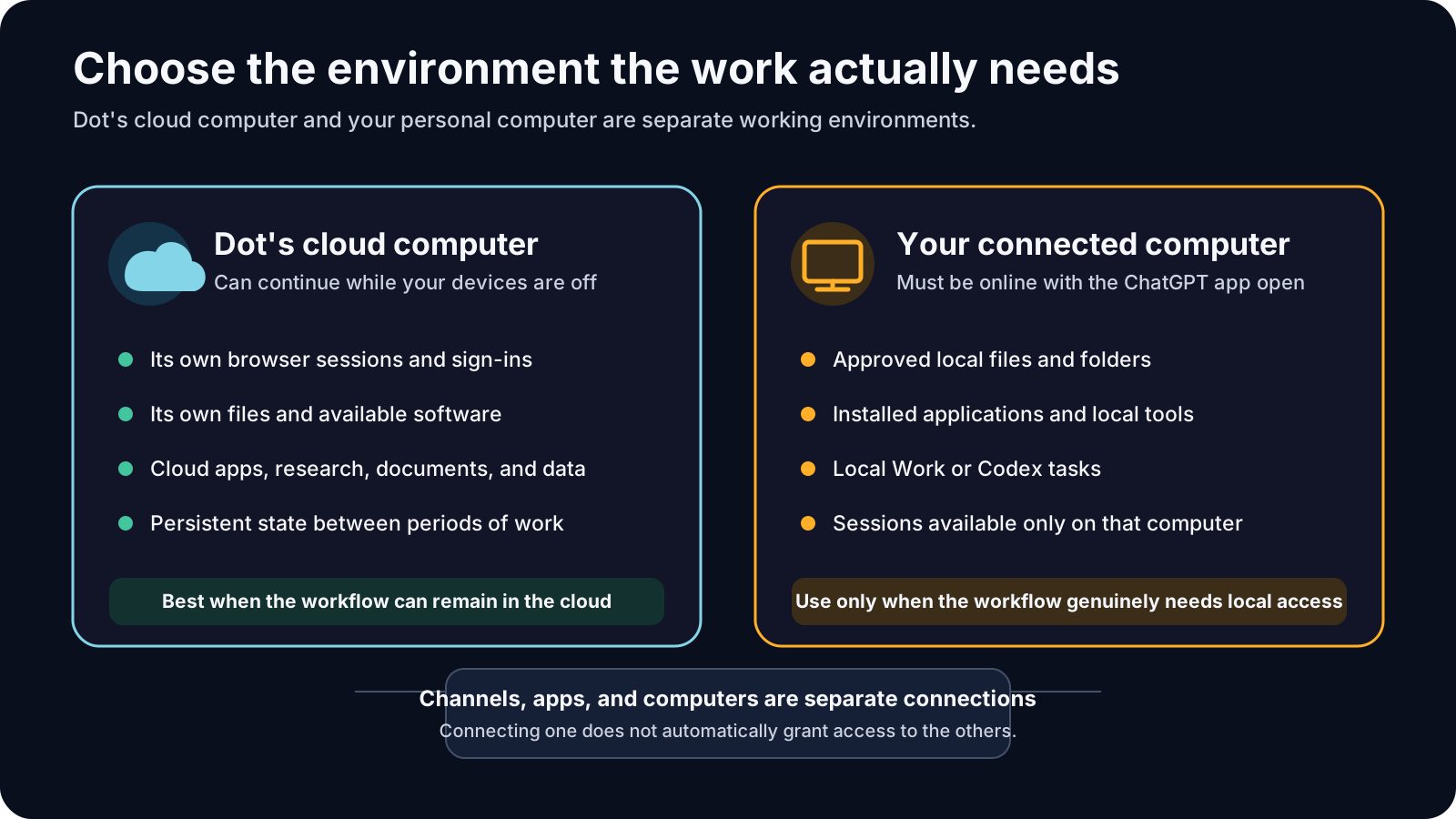
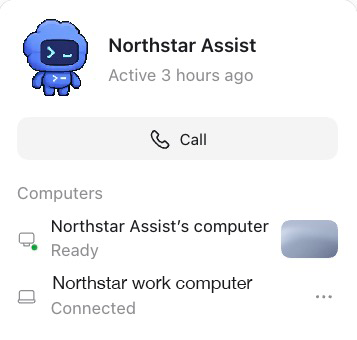
Use the cloud environment when it can complete the work safely. Use a connected computer only when the workflow genuinely needs local resources.
A Dot may work with supported apps or plugins installed and enabled for your account. Each connection uses the account and permissions associated with it.
For example, an email connection may permit reading without sending. A cloud-drive connection may permit reading certain files without allowing deletion. A messaging channel may let you talk to your Dot without giving it access to your inbox, computer, or other services.
Treat each connection as a separate capability:
| Connection | What it provides |
|---|---|
| Messaging channel | A place to talk to your Dot and receive updates. |
| App or plugin | Access to that service's information and actions within its permissions. |
| Dot cloud computer | A separate cloud environment for browser, file, research, and supported software work. |
| Connected personal computer | Access to approved local files, applications, and tasks while the computer is available. |
If a website requires a login, the Dot may request a private sign-in or ask you to take over its cloud browser. Its browser does not inherit a login from your personal browser. Some websites may block cloud browsers or require additional verification.
Login, multifactor authentication, CAPTCHAs, password changes, and security confirmations remain human handoffs. Do not place credentials, verification codes, or secrets inside an operating prompt.
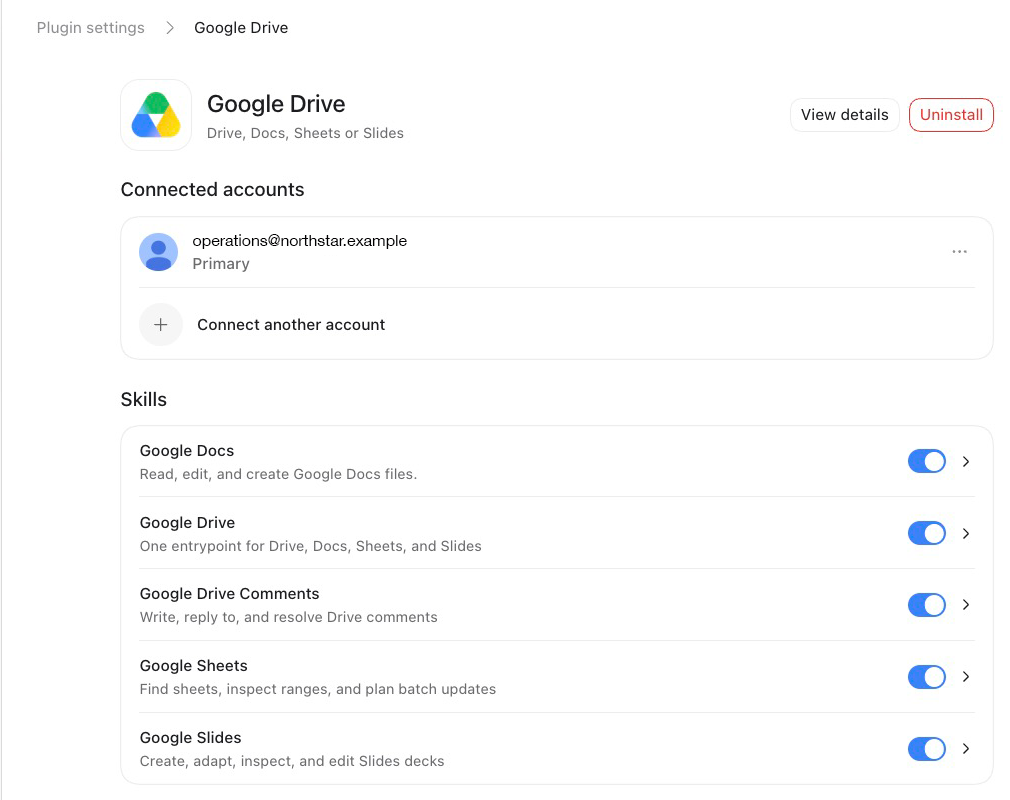
These three ideas are easy to blur:
A Dot might have access to an email account and permission to send messages, while your responsibility authorizes it only to prepare drafts. All three conditions matter.
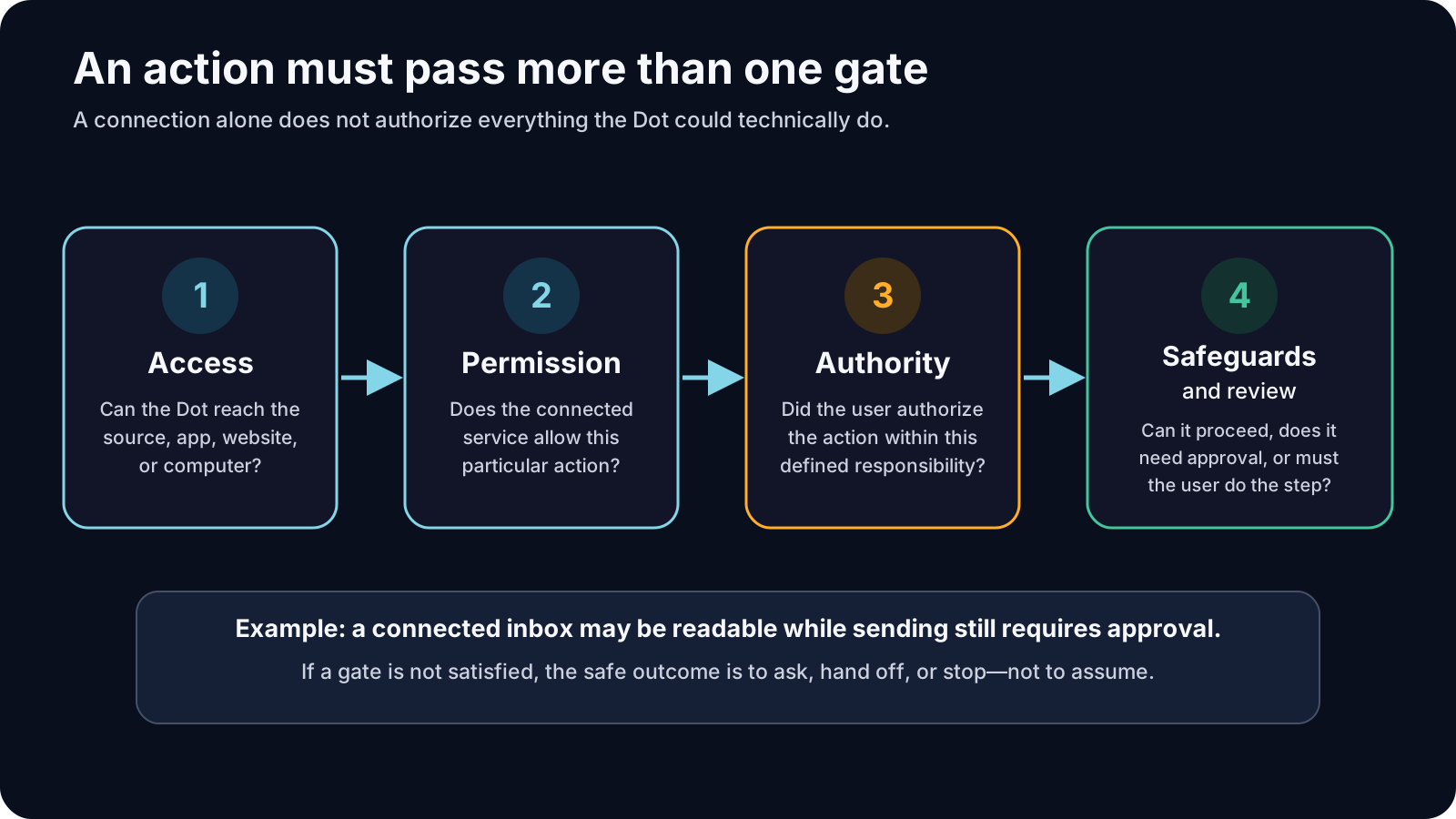
The conversation should explain the responsibility and its working boundaries. Custom rules are useful when a particular approval boundary should apply repeatedly.
Current Dot controls can distinguish among actions it may take without asking, actions it may take when you explicitly request them, actions that always require approval, and actions it must hand off to you.
Custom rules do not grant access to a service or computer. They do not override built-in safety requirements, and the Dot can still make mistakes. Review the permissions of connected apps separately.
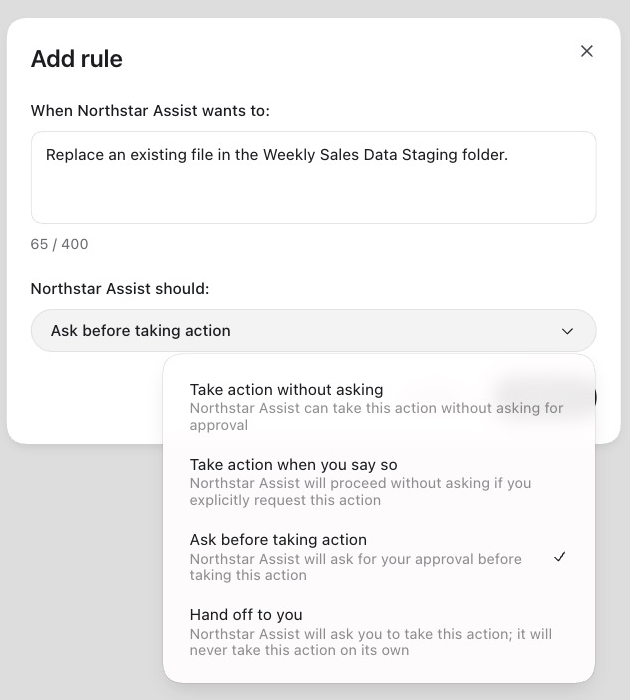
Examples of useful recurring boundaries include:
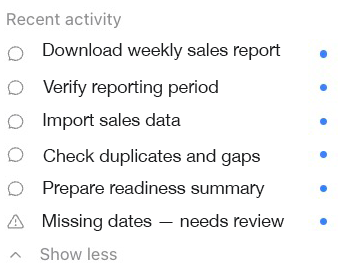
Open your Dot's profile and review Recent activity or Activity, depending on the interface available to you. Open an item when you need to inspect its progress, files, results, errors, or requests for input. Use Scheduled to review recurring work, including its instructions, timing, destination, and run history.
Pausing the Dot's main work, stopping a delegated task, and canceling a recurring schedule are separate actions. Stopping work does not undo actions already completed.
Before relying on a recurring responsibility, make sure you know how to:
Start with work you already repeat. Do not begin with the most complicated process in your life or business.
A strong first responsibility usually has these characteristics:
A weak first responsibility depends on unwritten judgment, broad access, unclear success, or irreversible action.
Possible starting points include:
Before scheduling anything, create a written specification.
Describe the result that should remain handled over time—not merely the first action.
Weak: “Download the sales report.”
Stronger: “Prepare complete, validated weekly sales data for Monday's operating review.”
List the normal sequence in the order it should occur. Include checks, not just actions.
Name the approved source account, report, folder, system, and output location. Avoid broad instructions such as “find whatever you need.”
State what the Dot may do independently, what requires approval, and what it must never do.
Identify missing information, expired access, conflicting results, duplicate files, failed imports, and other conditions that should stop or redirect the workflow.
Define the evidence required before the Dot may report success. “The task ran” is not enough.
Specify whether the responsibility begins once, repeats at fixed times, responds to a supported event, or operates during a defined window. Include the time zone and an end date when one is appropriate.
I am considering giving you this ongoing responsibility: prepare the information required for our weekly sales review. Do not schedule or perform the work yet. Help me define it in seven parts: responsibility, workflow, sources and destinations, authority, exceptions, completion, and timing. Ask only the questions that must be answered before the responsibility can operate safely. Identify any step that depends on a connection, permission, login, local computer, or human decision.
The purpose of this prompt is diagnosis. It asks the Dot to reveal what is still unclear before automation begins.
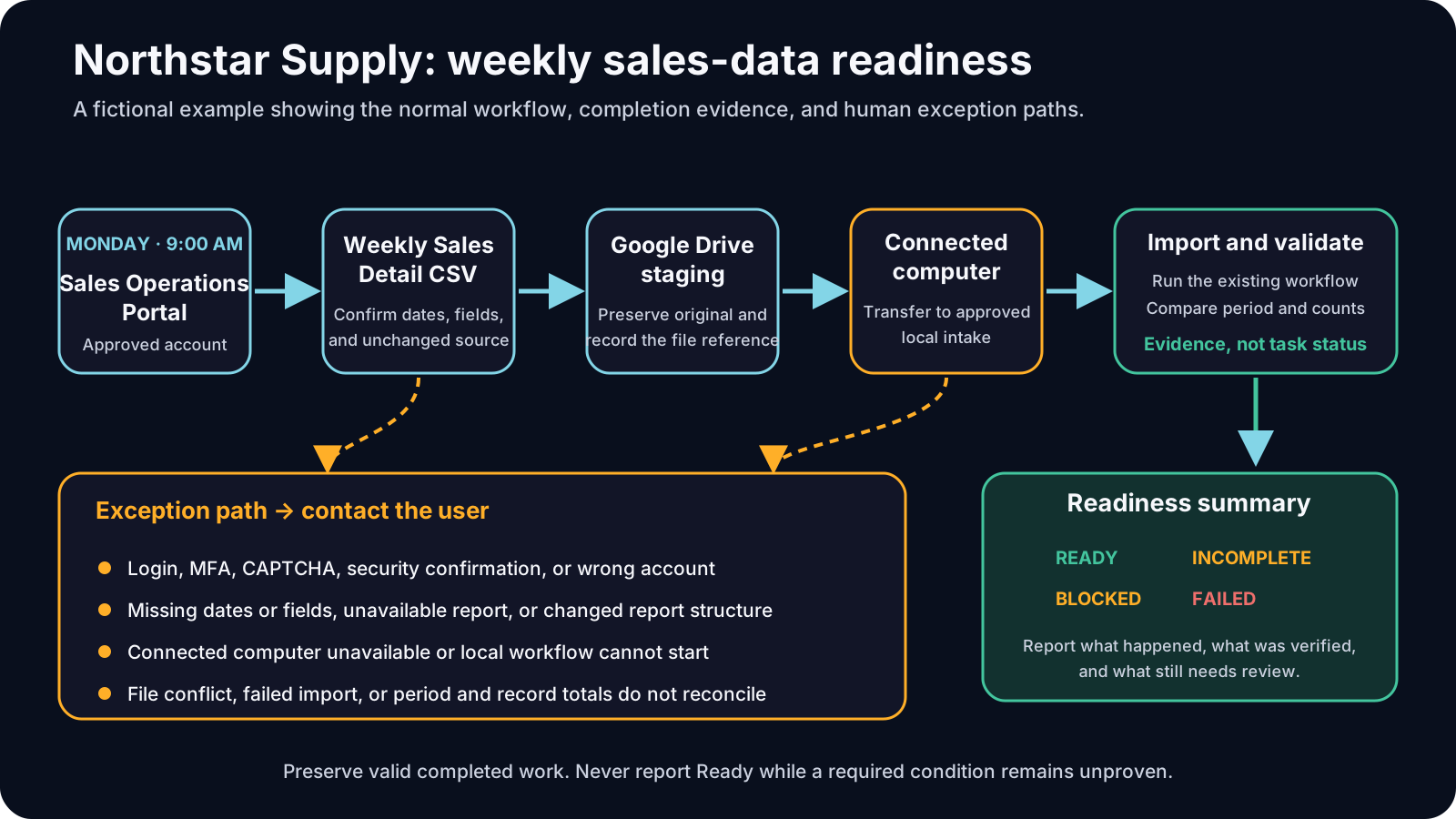
The example below follows Northstar Supply, a fictional online retailer that needs current sales data every Monday.
Northstar uses a fictional Sales Operations Portal at portal.northstar.example. The portal produces a Weekly Sales Detail CSV report. By the beginning of the weekly review, the original report must be preserved, its period and structure must be validated, its records must be imported into Northstar's approved internal reporting system, and a readiness summary must state whether the evidence is complete.
The portal and company are fictional, but the operating pattern is real. The source could instead be Amazon Seller Central, Shopify, Etsy, WooCommerce, or an organization's private reporting system. The Guide concentrates on designing the Dot responsibility rather than teaching the interface of any one sales platform.
The example uses:
Begin with the responsibility and the reason it exists.
I want you to help manage an ongoing responsibility called Weekly Sales Data Readiness for Northstar Supply. The purpose is to ensure that complete, validated sales data is ready before our Monday operating review. A successful run ends with the original Weekly Sales Detail report preserved, the required period confirmed, the data imported through Northstar's existing local workflow, the final validation passed, and a readiness summary delivered to me. Do not schedule this responsibility yet. First, restate the outcome in your own words and list the information you still need from me.
Review the Dot's restatement. Correct any interpretation that reduces the responsibility to “download a report” or assumes authority you did not give.
Tell the Dot where each step must happen. Do not assume that a login or file available on your computer is also available in its cloud environment.
Map this responsibility across the environments it requires. The Weekly Sales Detail report begins in Northstar's approved Sales Operations Portal account. Preserve the unchanged download in the Google Drive folder named Weekly Sales Data Staging. Northstar's import and validation workflow runs on my connected computer. Completion and exception updates should come to me in ChatGPT. Do not connect, sign in, download, schedule, or change anything yet. Tell me which parts can run in your cloud environment, which require my connected computer, and which require a human handoff.
The answer should expose environmental dependencies before you test the workflow.
Connect only the app, website, folder, or computer the workflow needs. Review the account and product permissions yourself.
Then ask the Dot to perform a read-only qualification.
Check whether the required sources and destinations are available for this responsibility, but do not download, upload, replace, import, send, schedule, or modify anything. Confirm separately whether you can reach: Northstar's approved Sales Operations Portal account and the Weekly Sales Detail report area; the Weekly Sales Data Staging folder in Google Drive; my connected computer; and Northstar's established local import workflow. For each one, report Available, Needs my action, or Unavailable, and explain the smallest next step. Do not attempt repeated logins or request credentials in this conversation.
Do not treat access to one service as proof that every other source is available. Account selection, expired sessions, multifactor authentication, or local-computer availability may still block the run.
Once the environment is understood, provide the exact normal sequence.
For a normal Weekly Sales Data Readiness run, follow this sequence:
Do not perform the workflow yet. Review these steps for ambiguity, duplication risk, missing verification, or an unsafe assumption. Ask me to resolve each issue before we test it.
This review is valuable because a process that sounds complete to a person may still omit a filename convention, expected field, duplicate rule, or authoritative date source.
Routine actions can proceed independently only when their scope is clear.
Within this responsibility, you may independently read the approved source, download the specified report, create a new dated staging folder when required, preserve a new source file, run the existing approved import, and produce a readiness summary.
Ask before replacing a nonidentical file, changing a source or destination, using a different account, altering the import workflow, or sending information anywhere outside the approved destinations.
Hand off all login, multifactor authentication, CAPTCHA, password, security-confirmation, deletion, financial, account-setting, or permission changes to me.
Never change sales-platform settings, prices, campaigns, products, users, integrations, or historical source files as part of this responsibility.
Restate these boundaries as Allowed without asking, Ask first, Hand off to me, and Prohibited. Identify any boundary that should also become a custom rule.
Review the result before saving any custom rule. The broad responsibility belongs in the conversation; recurring action boundaries may justify rules.
Do not wait for a failure to decide how the Dot should respond.
Stop the normal workflow and contact me if any of these occur: the approved account cannot be confirmed; a login or security step is required; the report is unavailable; the requested dates are incomplete; required fields are missing; a nonidentical file already uses the intended name; the connected computer is unavailable when local work is required; the import reports an error; record counts or dates do not reconcile; or any action would exceed the approved authority.
Preserve completed, valid work. Do not report the responsibility as complete while a required step remains pending. In the exception message, tell me: the step that stopped, what completed safely, the evidence preserved, whether a retry appears safe, and the smallest action you need from me. Do not repeatedly attempt authentication or create duplicate work.
This makes the exception message operational. “Something went wrong” is not enough to resume safely.
A completed run is not the same as a successful result.
Mark Weekly Sales Data Readiness as Ready only when all of the following are true: the report came from the approved account; its period matches the required dates; the unchanged source file is preserved in the approved staging location; the local import completed through the established workflow; the imported period and record counts passed the final validation; and the readiness summary includes the source period, file reference, validation result, and any item I still need to review.
If any condition is not proven, use Incomplete, Blocked, or Failed instead of Ready. Explain which condition remains unsatisfied. Do not infer success from a task status alone.
This is the point at which the responsibility becomes verifiable rather than merely repeatable.
Do not begin with a permanent recurring schedule. Test the responsibility once using a bounded report period and remain available to review handoffs.
Run one supervised test of Weekly Sales Data Readiness for the reporting period [START DATE] through [END DATE]. This is a test, not a recurring schedule. Follow the approved workflow and authority boundaries. Stop at every required approval or human handoff. Preserve the source report unchanged, avoid duplicate or conflicting files, and provide a final Ready, Incomplete, Blocked, or Failed summary with the evidence for that status. Do not create recurring work after the test.
During the test, inspect Recent activity or Activity and open any delegated task the Dot creates. Check the actual source file, destination, import result, and validation—not only the completion message.
The first run will often reveal a missing rule or hidden dependency. Update the responsibility itself rather than relying on a one-time correction that will be forgotten.
Review the controlled test with me. Separate the findings into: specification problem, access or permission problem, source-data problem, workflow problem, verification problem, and temporary failure. For each issue, propose the smallest change to the responsibility specification. Do not broaden your authority or create a schedule until I approve the revised specification.
This keeps improvements deliberate. A temporary exception should not automatically become permanent authority.
Only schedule the responsibility after the controlled run passes.
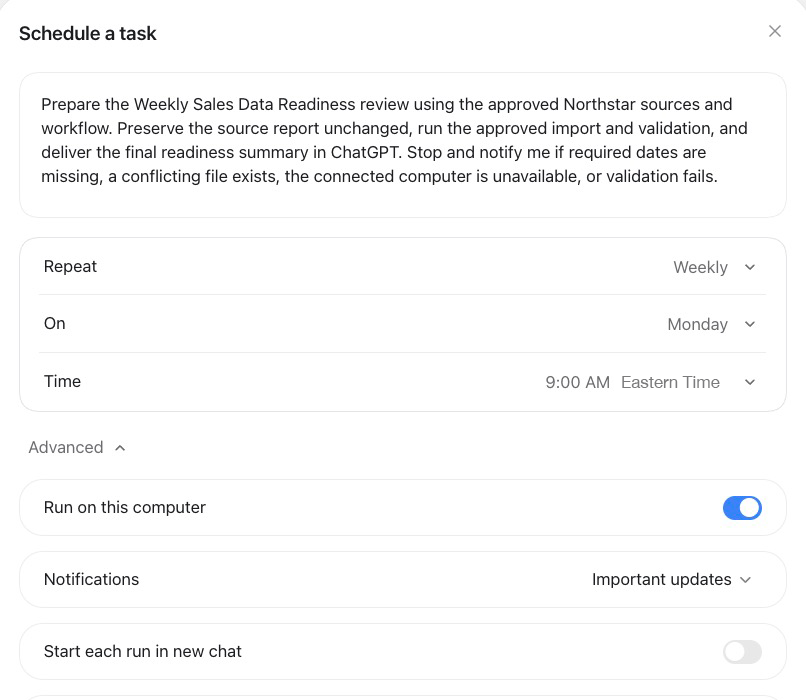
Fixed recurring work needs a saved schedule. Specify what should happen, the time and time zone, an end date when appropriate, what deserves a notification, and where results should be delivered.
Create a recurring schedule for the approved Weekly Sales Data Readiness responsibility. Begin every Monday at 9:00 AM Eastern Time (America/New_York). Use the reporting period defined in the approved specification for that week's review. Deliver the final readiness summary in ChatGPT. Notify me immediately only when a human handoff, consequential decision, changed blocker, or failed completion condition requires attention; keep routine progress in the task activity. Do not change the approved workflow or authority boundaries. Confirm the exact instructions, timing, time zone, destination, and schedule you saved.
If the creation form displays a local time zone without offering a separate time-zone selector, do not assume that naming another zone in the instructions changes the trigger. Do not save the schedule until you have accounted for the difference or used a scheduling surface that lets you confirm the intended zone. Then inspect the saved schedule—especially around daylight-saving changes—before relying on it.
Open Scheduled and compare the saved task with what you intended. A confirmation message is helpful, but the saved schedule is the item that will run.
If the source supports event monitoring, you may eventually replace or supplement a fixed schedule with a supported event. Ask the Dot to confirm which events it can actually follow. Connecting a source does not create an event-monitoring responsibility by itself.
Autonomy does not remove oversight. It changes oversight from constant instruction to purposeful review.
For early runs, review:
As confidence grows, routine review can become lighter. Consequential results should still be checked against their sources.
When a run fails repeatedly, determine which part of the operating design needs attention:
Do not solve every recurring problem by giving the Dot more authority. Sometimes the correct improvement is a clearer source, a more reliable validation, or a better handoff.
Pause the main Dot when you need to interrupt its current work. Stop a delegated task separately through Recent activity or Activity. Disable or delete future recurring work in Scheduled.
Before deleting a Dot or removing a connection, preserve any result or record you still need. Stopping work does not undo changes already made in a connected system.
Use this specification before asking a Dot to operate recurring work.
Name: Purpose: Result that should remain handled: Owner:
One-time date, recurring schedule, or supported event: Time and time zone: Operating window: End date or review date:
Approved sources: Approved accounts or properties: Cloud destinations: Local destinations: Where updates should be delivered:
Work that can remain in Dot's cloud environment: Work requiring a connected personal computer: Apps or plugins required: Website sessions required: Human authentication steps:
1. 2. 3. 4. 5.
May proceed without asking: Must ask first: Must hand off to the user: Prohibited: Custom rules required:
Missing or incomplete source: Connection or computer unavailable: Authentication required: Duplicate or conflicting result: Validation failure: Unexpected decision: Retry rule: Escalation message requirements:
Required evidence: Verification checks: Completion statuses: Final report contents:
Bounded test period: Human reviewer: What must be inspected: Conditions for approving recurrence:
Before allowing the responsibility to recur, confirm:
The goal is not to remove yourself from the process completely.
It is to stop spending your attention on every routine step while keeping control of the decisions and consequences that still belong to you.
Product guidance checked October 31, 2026: